Saturday, 8 June 2013

JNTU Kakinada B tech R10 4-1 CSE Subjects for the Semester


The following are the Subjects for the 4-1 Semester, CSE, JNTU Kakinada, Syllabus will be updated soon...

Subjects:
  1. Cryptography and Network Security
  2. UML and Design Patterns
  3. Data Ware Housing and Data Mining
  4. Mobile Computing
  5. Open Elective:
    1. MAT LAB (Except CSE, IT, ECE, EEE)
    2. Web Services (except CSE, IT)
    3. Open Source Software
    4. Cyber Laws
  6. Elective I:
    1. Computer Forensics
    2. Cloud Computing
    3. Software Project Management
    4. Machine Learning
    5. Distributed Databases
  7. UML & Design Patterns Lab
  8. Mobile Application Development Lab
The Subjects carry 4 credits each (Including the Electives) and the Labs carry 2 credits each...

Good Luck!

Monday, 18 March 2013

Java Data Base Connectivity (JDBC)

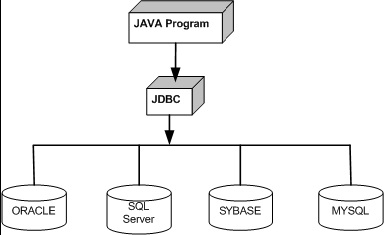
Java provides the connectivity of the user's program to a database, using a set of programming Interfaces, API called JDBC. JDBC is an acronym of Java Data Base Connectivity, using which we can connect and manipulate data on a database. The support for JDBC has begun from Java Standard Edition JSE 1.1 Since the motto of Java is to provide platform independent usability, JDBC too aims at the Database vendor Independence of the programming. 

To get connected to any database, it is general to use a driver, which is specific for a vendor. Java Data Base Connectivity provides four types of Drivers, popularly called JDBC Drivers for connectivity. they are:

Type 1: JDBC-ODBC Driver---

This is used for small scale database connectivity  which makes use of a JDBC-ODBC bridge driver to get connected to the database. The client system must contain an installed ODBC driver for this purpose, which is done in the following steps.

1. Open Control Panel
2. Open Administrative Tools (present in the Category View)
3. Open Data sources (ODBC)
4. Click the Tab User Dsn and click Add
5. Look for "Microsoft ODBC for Oracle" and the give the Name
6. Click OK and you are done!

Type 2: Native API partly Java Technology Enabled Driver--

This type of driver converts JDBC calls into calls on the client API for Oracle, Sybase, Informix, DB2, or other DBMS. Note that, like the bridge driver, this style of driver requires that some binary code be loaded on each client machine. 

Type 3: Pure Java Drive for Data Base Middle ware--


This style of driver translates JDBC calls into the middle ware vendor's protocol, which is then translated to a DBMS protocol by a middle ware server. The middle ware provides connectivity to many different databases.

Type 4: Java to Database Pure Java Driver---

This is also called a light weight driver, this can be used to directly connect a client side system to a remote server system. a light weight driver and can be used free of cost. This style of driver converts JDBC calls into the network protocol used directly by DBMS allowing a direct call from the client machine to the DBMS server and providing a practical solution for intranet access. 


The interfaces and classes in the JDBC are in the java.sql package.


Out of all the interfaces present in the package we mostly come across three major interfaces, 
  • Connection
  • Statement
  • ResultSet
Connection : java.sql.Connection, this interface is used to establish a connection to a database.

Statement: java.sql.Satement, this interface is used to write the sql statements in through the java programming language. and get them executed.

ResultSet: java.sql.ResultSet, this interface is used to store the resultant rows, it acts like a buffer that can be retrieved row wise.


Let me Demonstrate with the following Example----

import java.sql.*;                    //To use the interfaces and classes of JDBC we use this statement

public class DataBaseDemo{
    
            public static void main(String[] args)throws Exception{
               
                     Connection con=null;
             Statement st=null;               //The variables of the types are initially assigned to null
             ResultSet rs=null;

                     try{

// The interfaces raise an exception SQLException, for which we use try-catch block to handle them.
                                   
                       Class.forName("sun.jdbc.odbc.JdbcOdbcDriver");
                             // This statement calls the type of driver to be used.
       
                       con= DriverManager.getConnection("jdbc:odbc:dsn","scott","tiger");
                            // Here we get the connection to the database using the JDBC-ODBC driver
       
                       st = con.createStatement();          
                            // An environment for sql statements is created.
                       
                       rs = st.executeQuery("SELECT * FROM student");
                            // Here the method executes the Query, select * from student and returns the rows to the Resultset variable, rs which acts like an implicit cursor to work with.

                       while(rs.next()){
                                System.out.print(rs.getInt(1)+"\t"+rs.getString(2)+"\t"+rs.getString(3));
                // here the individual columns are represented by the getter methods for the respective data types.
                        }
             
                }


               catch(SQLException e){
                     System.out.print(e.getMessage());
               }
               finally{
                             rs.close();
                             st.close();
                             con.close();
               }
   }

}                       


Sunday, 3 February 2013

My Windows 8 Review

Many years after the release of Windows 7, when a new version was announced, It created much curiosity in the market because 7 was a good combination of beauty and performance. Although it too had some flaws i it, the new version might have something to remove it. After surfing for details regarding it, I've go to know many things about it. Windows 8 was under its development even before windows 7 was launched! the existence of the same was revealed in CES 2011, and then a user preview version of it was released. it then raised the hopes among the users with its much enhanced user interface and support for touch interface. Windows 8 was released for three forms of computing: tablets, Laptops and Desktops. Also a mobile version of it for use in windows phones called Windows RT: that finds compatibility for smart phones with ARM architecture was also released. Now we have all together four forms of Windows Operation System for computation in the market.


Windows Phone 7.5 was another form of Windows' new Operating System optimized for smartphones. Nokia Lumia was one among many companies to adopt this Operating System, to their hardware.

Lets Explore the Desktop:

Windows 8 has is an operating system  that mostly works with the help of internet: i'm not saying you can't work without internet, but its true that most of the programs: apps cannot work without internet connection. So for enjoying the features, go get a internet connection. You need a Windows Live account or mostly a Hotmail account to work with windows 8.

Requirements for Desktop:

Processor: 1 gigahertz (GHz) or faster with support for PAE, NX, and SSE2 (more info)

RAM: 1 gigabyte (GB) (32-bit) or 2 GB (64-bit)

Hard disk space: 16 GB (32-bit) or 20 GB (64-bit)

Graphics card: Microsoft DirectX 9 graphics device with WDDM driver

There's no thing called log in and log out with your username, you can log in with your live mail id, like with your username. All the programs you have in windows 8 actually have to called as apps. Because they look and feel are much like apps than programs. There are some apps that create interest in the users:


As I have mentioned earlier, you need to possess a live account for you, or most likely a Hotmail account so that you can enjoy the features of this OS. All the apps in windows 8 need a Microsoft account to get worked.


The start menu in windows 8 is the main attraction: its much enhanced, elaborated and is dynamic! the colors and background can be changed, the boxes represent the thumbnails of the applications present in the computer. its similar to the start menus of win 7 or XP, but its much stylish than them!                                   

The Messages app in the start menu, is interesting as a dedicated chatting app for windows. It supports windows live accounts and Facebook accounts. So you never need to look after a new Facebook messenger for you!

The Video app in the start menu, is a dedicated movie/ video player for windows, other than WMP. It supports mp4, mkv etc., formats but doesn't have support for 3gp videos. Also the plyer displays a list of xbox videos, that can be streamed.

Windows 8 also has a Weather ap powered by Bing. This can show you the current weather conditions in your place. But this too needs a Microsoft account to access.

The sports app, gives you the sports news and matches and lots more! a complete app dedicated for sports.

Music app, is a music player for windows 8, that provides a beautiful play of all the music files on your computer. 

The photos app helps to view all the photos located on your computer. but the photos that are present in the pictures library are only displayed. 

The people app, is like a social network app that gives a summary of the feeds of social networking sites like Facebook  twitter, linked in etc., its a great app, with the options of notifications, chat and wall feeds.

Tip: I've come to know that if we want to take a screen shot, just press windows key + Prt Scr


Tuesday, 29 January 2013